Reach Us: +2348105460778 or +2348121073763

RGB vs CMYK: What Is the Difference for Printing?

If you have ever designed a flyer, business card, banner, brochure, invitation, T-shirt, or other printed material, you may have heard someone say:
“Make sure the design is in CMYK.”
But what exactly does CMYK mean?
And what about RGB?
Why does a design sometimes look bright and beautiful on your phone or computer but look slightly different when printed?
These are common questions, especially when you design your own artwork and then send it to a printing company.
In this guide, we will explain RGB and CMYK in simple terms, why they matter when printing, what can happen when you use the wrong color mode, and what you should do before sending your design to LAskill Printing.
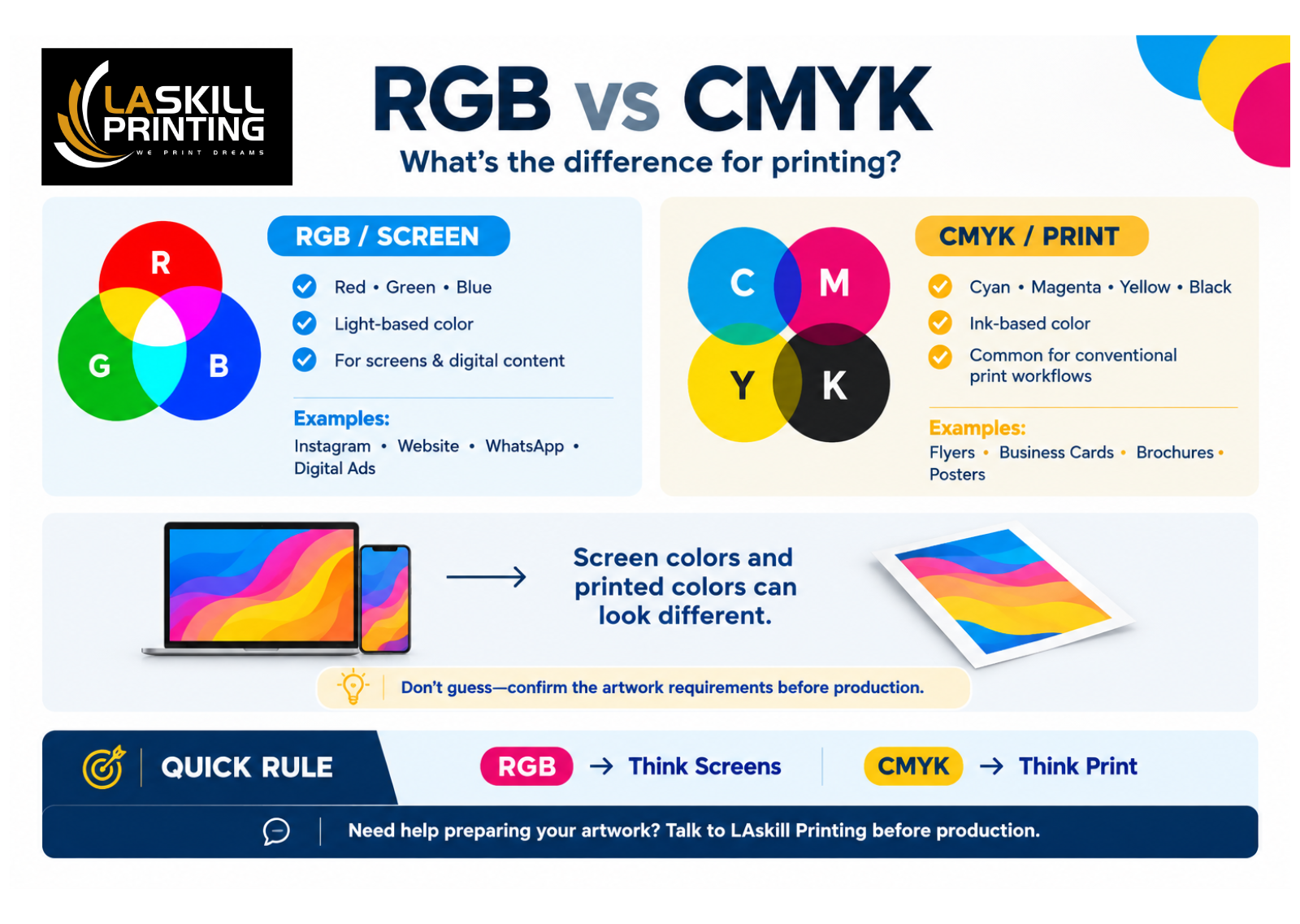
What Is RGB?
RGB stands for:
- R — Red
- G — Green
- B — Blue
RGB is the color system commonly used by devices that display images using light.
Think about the screen you are looking at right now.
Whether you are using:
- A smartphone
- Laptop
- Desktop computer
- Tablet
- Television
the colors you see on that screen are being produced using light.
That is where RGB comes in.
When red, green and blue light are combined at different intensities, they can produce many different colors.
This is why RGB is commonly used for things such as:
- Social media graphics
- Website images
- Instagram posts
- Facebook graphics
- TikTok content
- YouTube thumbnails
- Digital advertisements
- Website banners
If your design is going to remain digital, RGB is usually what you will be working with.
What Is CMYK?
CMYK stands for:
- C — Cyan
- M — Magenta
- Y — Yellow
- K — Black
Unlike RGB, CMYK is associated with the colors used in printing.
When you print something, you are no longer displaying an image with light from a screen.
You are putting ink onto a physical material such as:
- Paper
- Card
- Sticker material
- Packaging
- Brochure paper
- Other printable surfaces
The printing process uses combinations of cyan, magenta, yellow and black to reproduce colors.
That is why you will often hear designers and printers talk about CMYK when preparing artwork for printing.
RGB vs CMYK: What Is the Difference?
The easiest way to understand the difference is this:
RGB is mainly for screens.
CMYK is mainly for printing.
For example:
| RGB | CMYK |
|---|---|
| Used mainly for screens | Used mainly for print |
| Red, Green, Blue | Cyan, Magenta, Yellow, Black |
| Uses light | Uses ink |
| Common for social media designs | Common for printed designs |
| Websites | Flyers |
| Digital advertisements | Business cards |
| Instagram graphics | Brochures |
| Facebook graphics | Posters |
| Digital banners | Printed stationery |
This is the simple explanation.
But there is something else you need to understand.
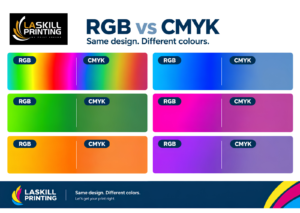
A color that looks one way on your screen may not look exactly the same when printed.
And this is where many printing problems begin.
Why Does My Design Look Different When Printed?
Imagine that you create a flyer on your phone or computer.
You choose a very bright blue.
On your screen, the blue looks:
Bright. Sharp. Vibrant.
You send the design for printing.
When you receive the printed flyer, the blue may look slightly different.
It may be:
- Less bright
- Slightly darker
- Less vibrant
- A little different in tone
You may immediately think:
“The printer changed my color.”
Sometimes the issue is not that the printer changed the design intentionally.
The problem is that your screen and a printed sheet produce color differently.
Your screen uses light.
The printed material uses ink.
So you should not expect every color you see on your phone or computer to reproduce exactly the same way on paper.
Why This Matters Before You Print
This is especially important when you are printing something where your brand colors matter.
For example, imagine you have a business logo with a particular shade of:
- Green
- Blue
- Red
- Orange
- Purple
You may have spent time choosing that exact color because it is part of your brand.
If you are preparing the artwork for printing, the color needs to be considered as part of the print preparation process.
This is one reason we recommend that customers do not simply design something on their phone and immediately send it for printing without checking the artwork first.
RGB Is Not “Bad” for Printing
This is an important point.
You may hear someone say:
“RGB is bad. You must always use CMYK.”
That is too simplistic.
RGB is not a bad color mode.
It is simply designed primarily around digital display.
And different printing technologies can have different workflows.
So instead of blindly changing every design to CMYK, the better approach is:
Know what you are printing and ask what file setup is required for that particular job.
At LAskill Printing, if you are unsure about your artwork, you can discuss the design with us before production.
When Should You Use RGB?
RGB is usually the better choice when your final design will be viewed on a screen.
For example, if you are creating:
Instagram graphics
Your design will be displayed on phones and computers.
RGB makes sense.
Facebook graphics
Again, the final destination is a screen.
RGB is appropriate.
Website graphics
Your website visitors will view the design digitally.
RGB is commonly used.
Digital advertisements
If the advertisement will be displayed online, RGB is generally appropriate.
WhatsApp graphics
If you are creating an image specifically to share digitally through WhatsApp, you are designing for a screen.
RGB is generally appropriate.
When Should You Use CMYK?
If you are preparing artwork for a conventional print workflow, CMYK is commonly used.
For example:
Flyers
A flyer that will be physically printed should be prepared with the printing process in mind.
Business Cards
Since the final product is a physical card, CMYK is commonly used in the print workflow.
Brochures
Printed brochures are another example where CMYK is commonly used.
Posters
If you are sending a poster for physical printing, you should consider the print color workflow before submitting the artwork.
Invitations
Wedding invitations, birthday invitations, church programmes and other printed invitations require consideration of the print setup.
Business Stationery
Letterheads, branded documents and other physical stationery are also print products.
What About T-Shirt Printing?
This is where things become a little more interesting.
You should not automatically assume that every T-shirt printing project uses exactly the same color workflow.
The appropriate setup can depend on:
- The printing method
- The equipment being used
- The type of transfer or ink
- The color of the T-shirt
- The artwork
- The production process
For example, preparing artwork for a digital T-shirt printing process can be different from preparing artwork for another printing method.
So if you are ordering custom T-shirts from LAskill Printing, don’t guess the required file setup.
Send the artwork or discuss the project with us first.
We can help determine what is needed for the particular printing job.
If you are interested in custom T-shirts, you can also read our guide:
How Much Does T-Shirt Printing Cost in Nigeria?
Why Bright Colors Can Be Difficult to Print
Have you ever designed something with a very bright green, blue or orange?
It can look amazing on a phone screen.
Then you print it and think:
“This isn’t exactly what I saw on my screen.”
This can happen because screens can display certain bright colors that cannot always be reproduced in exactly the same way with physical inks on paper.
Think of your phone as producing color with light.
A printed flyer is producing color with ink on paper.
They are two different environments.
This is why professional printing requires more than simply looking at a design on your phone and saying:
“The color looks perfect.”
Your Phone Screen Is Not a Printing Proof
This is another mistake customers sometimes make.
A customer may show a printer a design on their phone and say:
“I want the printed color to look exactly like this.”
The problem is that phone screens can display colors differently from one another.
Your phone may have:
- Different brightness
- Different screen technology
- Different display settings
- Different color calibration
Even the brightness of the room can change how you perceive the color.
So the image on your phone should not automatically be treated as an exact representation of the final printed product.
Does Converting RGB to CMYK Solve Everything?
No.
Converting a design from RGB to CMYK can be an important part of preparing artwork for a print workflow, but it does not magically guarantee that the printed result will look exactly like your screen.
The final result can still depend on:
- The printing equipment
- Ink
- Paper
- Material
- Color settings
- The artwork itself
- The printing process
- Finishing
This is why proper print preparation matters.
And this is also why you should communicate with your printer before production when color is particularly important.
RGB vs CMYK for Common LAskill Projects
| Project | What to Think About |
|---|---|
| Instagram design | RGB / digital |
| Facebook graphic | RGB / digital |
| WhatsApp graphic | RGB / digital |
| Website image | RGB / digital |
| Flyer | CMYK / print workflow |
| Business card | CMYK / print workflow |
| Brochure | CMYK / print workflow |
| Poster | CMYK / print workflow |
| Invitation | CMYK / print workflow |
| T-shirt | Depends on printing method |
The table is a general guide. Your specific printing project may have different requirements depending on the production method.
Common RGB and CMYK Mistakes Customers Make
Mistake 1: Designing only for the phone
Your design may look perfect on your phone but still need preparation before printing.
Mistake 2: Expecting the screen and paper to look identical
They are different mediums.
Screen = light.
Print = ink/material.
Mistake 3: Changing everything to CMYK without asking
CMYK is important for many print workflows, but don’t assume it is the only thing that matters.
Mistake 4: Using low-quality images
Changing RGB to CMYK will not make a blurry image sharp.
Mistake 5: Forgetting to proofread
Color can be perfect and the printing can be perfect, but if your phone number is wrong, the design still has a problem.
Mistake 6: Sending the design at the last minute
Give yourself enough time to check the artwork before production.
What If I Don’t Know Anything About RGB or CMYK?
That’s okay.
You don’t have to become a professional graphic designer just to print a flyer or business card.
If you have your design already, you can simply let us know what you want to print.
We can discuss:
- The product
- Size
- Quantity
- Artwork
- Color requirements
- Printing method
- Finishing
- Other production details
The goal is to get your design properly prepared before we start production.
Need Help Preparing Your Design?
If you have already created your artwork and you’re not sure whether it is ready for printing, don’t wait until after production to discover a problem.
Send the design for review or contact LAskill Printing to discuss the job.
And if you are creating the design yourself, read our related guide:
How to Prepare Your Design for Printing
It will take you through the other things you should check before sending artwork for production.
Frequently Asked Questions
Is RGB better than CMYK?
Neither is simply “better.”
They are designed for different purposes.
RGB is primarily associated with digital screens, while CMYK is commonly associated with conventional printing.
Can I print an RGB design?
Yes, an RGB design can be processed for printing.
However, the printing workflow may require color conversion or other processing, so it is better to confirm the requirements before production.
Why does my design look brighter on my phone?
Your phone produces colors using light.
Printed materials use ink on a physical surface.
Because the two systems reproduce color differently, some colors may not appear exactly the same.
Should every design for printing be CMYK?
Not necessarily.
CMYK is commonly used for conventional print workflows, but the exact requirements can depend on the printing method and equipment.
If you are unsure, ask the printer before submitting the final artwork.
What should I use for Instagram, RGB or CMYK?
For a design intended to be viewed on Instagram, RGB is generally the appropriate color environment because Instagram content is displayed digitally.
What should I use for a flyer?
For conventional flyer printing, CMYK is commonly used.
However, make sure you follow the specific requirements of the printer handling your job.
What about T-shirt printing?
It depends on the T-shirt printing method and production workflow.
Instead of guessing, ask your printer what file setup they need for your particular T-shirt project.
Final Thoughts
RGB and CMYK may sound complicated when you first hear about them.
But the basic idea is actually simple.
RGB is mainly about displaying color on screens.
CMYK is mainly about reproducing color in conventional print workflows.
The biggest mistake is not using one instead of the other.
The biggest mistake is sending artwork for production without knowing what the printing process requires.
Whether you’re printing a flyer for an event, business cards for your company, invitations for a celebration, branded materials for your organization, or T-shirts for your team, getting the artwork right before production can save you time, money and unnecessary corrections.
At LAskill Printing, we don’t just print the file you send us. We want the finished product to work for what you need it for.
If you’re ready to print, contact LAskill Printing and let’s discuss your project before production.
📍 Inswad Plaza, Opposite FyneField Filling Station, Idoro Road, Uyo, Akwa Ibom, Nigeria
📞 0816 518 3620